
Boosting efficiency in manufacturing is all about using 3D design software such as Clo 3D and Browzwear to create awesome visuals and a detailed Tech Pack that fashion brands, big and small, keenly use at the moment.
These days, 3D modeling is a game-changer for quick prototyping, easy design tweaks, digital sampling, and collaborative workflows. Check out these four steps that make production faster and way more efficient:

First step: Develop designs
Creating a digital twin of your physical samples is the first step in developing what we call in the industry a ‘fit block’. Patterns created can be sent to your factory along with your tech pack.
You basically choose a style and fit your customer loves. From there, you develop different designs preserving the fit and brand identity taking into account your customer preferences.

Second step: Check FIT
After creating your digital twin, your next steps is “the virtual fit” achieved with a fashion design software such as Clo3D or Browzwear(the most popular).
Here is where you can check the strain and tension map to check how the garment drapes and fits on your chosen avatar.
Most great tech packs have a “fit page” where you can add your virtual fit snaps and comments. Choosing the correct fabric is key in checking the fit accurately. For example a jersey fabric that stretches in 4 directions will fit different than a 100% cotton fabric that has no stretch.
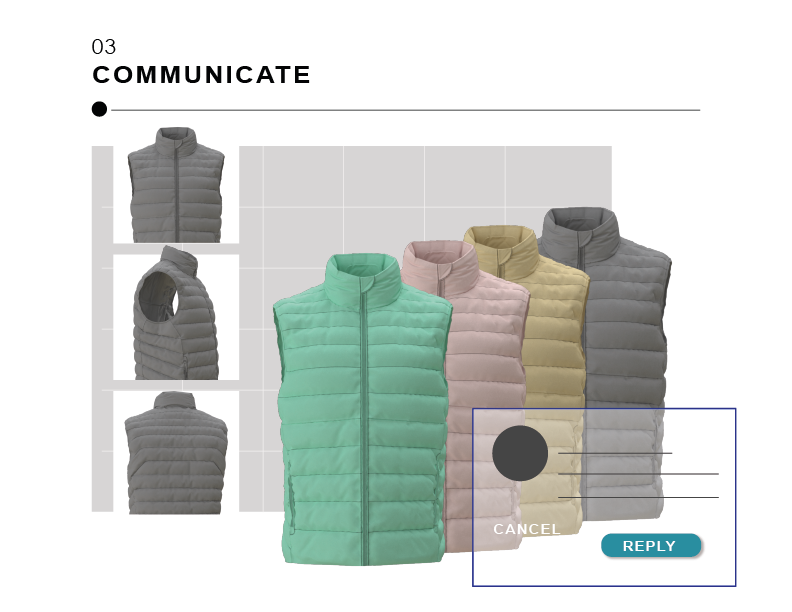
Third step: Communicate
At this stage, you have created the style in different colors. You are able to communicate your vision to buyers through fashion design software renders or even directly to your customer to ask for feedback.
You have a visual representation of you designs.
You could also create your designs in different sizes and lengths for your customer to actually be able to see themselves wearing your clothes. Colorways(your style in different colors) of your designs can also be added to your thoroughly created tech pack.
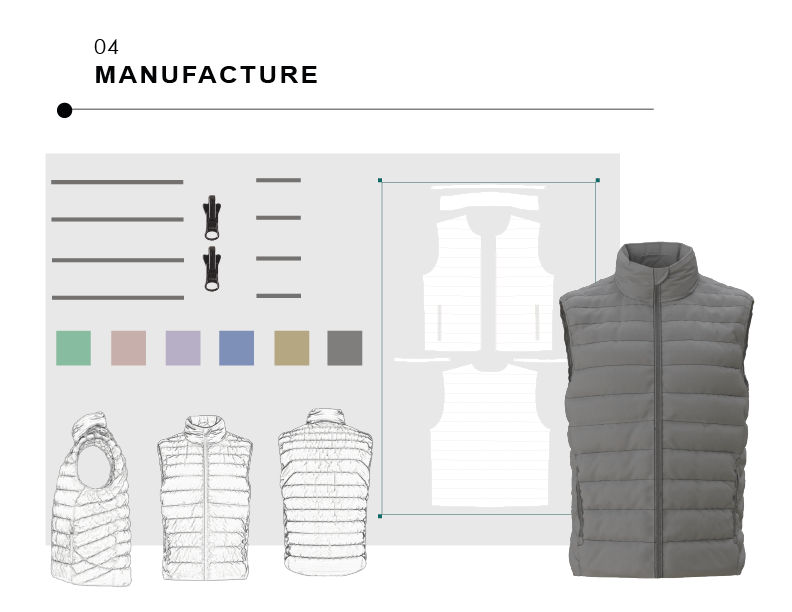
Forth step: Manufacture
After validation, you can start creating your tech pack to prepare for design production.
A tech pack can be easily generated through Clo or Browzwear’s built-in “tech pack creation” feature or in Excel, Illustrator or PLM if you work for a big company.
At this point, you can confidently specify the number of colors you plan to produce for your designs.
Patterns and the tech pack are being sent to your desired factory to start the sample and then production process. Many factories use the same 3D fashion design software as the main brands to facilitate to communication process.
What is a Tech Pack? A tech pack is also known as specification sheets, is a set of documents created by designers to explain their design to a manufacturer so that they can turn this information into a finished garment.
Prior to initiating the entire 3D software design process for efficiency in time, effort, and resources, companies usually invest time in building a virtual model or avatar to create their accurate “virtual fit model”.
This is the optimal approach to accurately create patterns tailored to your customers’ measurements. Our confident recommendation is to utilize Alvanon digital avatars, renowned for accurately representing real-life physical forms.”


Using powerful programs such as Browzwear and Clo 3D can speed up your entire process. From creating your designs digitally, check fit virtually, validating designs to the market, creating an accurate tech pack and starting your production journey with limited room to fail.
Click the image below to download my free tech pack guide and template below:
